iPad Finally

Well, I finally got my hands on a iPad and so far it has been interesting. I am working with a faculty member at work exploring the educational possibilities. We are exploring the options for both the instructor and student with many information communication technologies to enhance the teaching learning experience. So, how could we overlook the iPad.

for just under a week I have been exploring the options of the iPad and more specify the applications. While the iPad is a very nice piece of hardware it is also very much a software experience. Without the software it would be very limited, similar to the Android tablet that are currently on the market.

The software has been great from a consumer level. The news apps that I have used are great example of where the publishing world is going. The games are fun as well, but not my main focus. Surfing on the iPad is smooth and natural, minus of course the Flash content. I personally do not miss this as I find it a bothersome technology quite often. In many cases developers like to push it because it is easier to track users and serve ads to users. But they do not tell you this when critic knock Apple for omitting it from iOS.

Overall the iPad is a great portable consumption device the jury is still out on the usability for portable production. As I look to starting a graduate program in the fall, I would love to leverage this as a research tool. We will see how well that goes.

Note: This post was produced in the WordPress App for the iPad.
iPhone 2.OOOOhh

For my birthday last year, my wife (a sweetheart) bought me an iPhone.  While I thought that the iPhone would have third-party applications last year, around October, but instead there was just an announcement stating that Apple would allow applications sometime in the future.  Then again a few months later with my hopes high, it did not happen in March like I hoped.  But finally a little over twenty-four hours ago the Apple opened the App Store.  Now finally, I can load third-party apps on my phone without hacking by using some warranty voiding method, not that I was not tempted a few times.  

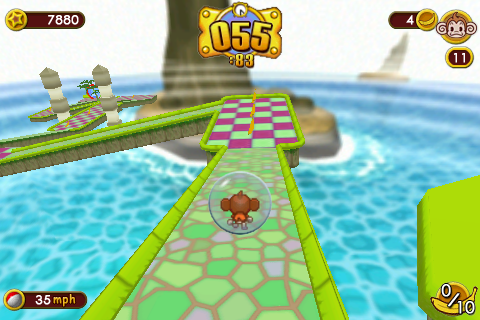
There is quite a variety (over 500) of applications at Apple’s iTunes store and I have downloaded a several already.  Some are good some have questionable value.  One in the later category is Saber Phone which simulates a Star Wars light saber.  It did bring big smiles to the kids face and we had a few laughs but I do not see this one lasting on my phone very long.  On the other end of the scale I have been playing a game and I am not by nature a gamer.  What is this wast of time that has caught my interest, Super Monkey Ball.  The game is played by rolling a ball that contains a monkey through mazes that become quite challenging fast.  And currently I am stuck at level seven.


Super Monkey Ball - Level 7

Besides being a fun game to play, the quality is amazing.  The graphics are stunning and I find the physics of using the phones motion sensors to control by tilting and shifting the game very entertaining.  The one need that the game does not fill that I wanted is a game that I could play when I am waiting (e.g. doctor, dmv).  But a grown man swerving around with a candy colored screen is a bit more than I think most of the public could handle.  But there is always solitaire or Bejeweled to fill that void.

Hootenanny

Last week, I was working on what I thought was a simple project but projects always have some challenges.  The project was a simple edit of about two hours of video that included lecture and demonstration interviews.  So I thought I would try out the new iMovie to do a quick edit and export to iDVD for the final product.  The editing went fairly smooth once some time was spent digesting the new interface.  Now an export to iDVD to build the menu and burn the DVD. But I realized that I needed to include some chapters in the project so that three interviews at the end of the program could be located easily.  Well, iDVD will only do time based chapters in equal increments and that wouldn’t work at all.  But if the video has chapters embedded in it then iDVD will automatically add the chapter menus to the video.  After some review, there was no sign of this function in iMovie but that was OK because QuickTime Pro can add chapters marker to video. 

To create the chapters you just need a carefully formatted text file that contains the chapter timings which is then imported into QT and converted to a movie.  This text only movie is then overlaid onto the video project, then magically you have a movie with navigational chapters.  Now all that is needed is to import the video back into iDVD, but alas once there it is still missing the chapters. iDVD does not respect QT chapters.  Now the frustration sets in and results in a trip to the Internet for some help from my anonymous support system.

After a not so quick search, I came across a little utility named Metadata Hootenanny that could solve my issue.  I could have created the chapters in this application easier than the text file method but they were already done.  So, all that was required as a quick save and and reimport into iDVD.  Once imported the chapter menu appeared just as I had expected earlier in this process.  Render and burn, I was done.  This is a great little utility and worth checking out for anyone that works with QuickTime, plus it has a interesting logo.